Showing posts with label review. Show all posts

09 December 2008

A review of the Creative Inspire T10i speakers

Quite a while ago I reappropriated my old HTC Magician as an internet radio. The set up was a bit convoluted, but worked quite well. in the interim, however, the phone was requisitioned by my parents and I went back to listening to my internet radio on the PC. I still think this is a bit of an overkill, and there is something vaguely annoying about having to boot up my desktop to listen to a bit of streaming Christmas music. Time to come up with another solution!

While I no longer have the phone, I still do have the SanDisk WiFi SD card and indeed the bluetooth speakers. The bluetooth connection was a bit wasted though, since the only PDA I have lying around at the moment is my old hp iPAQ h2210. This has bluetooth but does not support A2DP. In truth, the Acoutic Energies don't have the best sound anyway, with rather muddy basses and wooly highs. So I figured it was time to look for a new pair of speakers.

In the end I settled on a pair of Creative Inspire T10i speakers. I have had a really good experience with Creative's before and I know that in their price range their speakers really are unparalleled. I originally wanted to get one of the fancy X-Fi speakers since the music playing out of my PDA will have been digitally compressed. Most internet radio streams run at a feeble 96kbps I believe, and it would have been great to have some of that fleshed out using the X-Fi crystallizer system. I'm not going to argue the case for X-Fi, but suffice to say that response to it is a bit subjective - I love it for digital music.

Unfortunately, X-Fi systems come at a price premium and I didn't want to spend more than fifty quid on it. I found one review of the T10is on line and it was really positive, so I figured I would give them a shot. Even so, I was heading rather blindly into the purchase. I ended up spending just under £30 for the speakers on eBay and have to say that for the price the sound really is stunningly good.

The speakers themselves aren't particularly huge but they have a tweeter and a mid-sized cone, as well as a bass port exiting at the top. The right speaker has the volume and tone control knobs, and at the back a power and audio in port. This being the T10 'i' variant, it also came with a dock for an iPhone or iPod Touch - clearly this is something I do not need. As I mentioned, I am streaming internet radio through it at the moment, and the basses are rich and punchy with clean, crisp highs and rounded mids. The sound is really beyond what one would expect for speakers in this price range. Strongly recommended and well worth it: if only because I can now listen to O Come All ye Faithful without first hearing the Windows startup sound!

06 December 2008

A review of the Krussell touch screen pointer

This is a bit of an odd review because I'm discussing an accessory, not some piece of techie kit. But with my new WWAN modem I received a £10 voucher from the 3 accessories store. I had a quick look around, and frankly, a tenner really doesn't go very far, and how many phone socks does one person really need? On the other hand I am indeed a lanyard person. As someone who is clumsy at the best of times, it has stopped my expensive toys from falling onto the floor and smashing into a million pieces on many an occasion. When grabbing the phone from my pocket I also find it gives something handy to grasp onto. I hasten to add that I am not one of those people who like to add dangly bits of jewellery to their phones. I am strictly Corbusier-ian in that sense in that I belive that from is function.

Anyway, to cut a long and not very interesting story short, I decided to go with two Krussell touch screen pointers. The original designers are a company called Triforce based in Sweden, and I remember reading about them quite some time ago. The "triforce" allusion is not to Zelda but to a trangular piece of plastic which is looped through the nylon strap. It is this which you are supposed to pick up and use in lieu of a stylus.

Does it work? Well, yes, and very well indeed. The stylus is durable and sturdy, and the strap itself feels very durable. Do I actually use it? Sadly, given that I have a Touch Diamond which has TouchFlo 3D, an interface designed for the use of fingers, I would have to say no, not very much. If you are the kind of person who prefers to use the stylus, and are constantly losing it, then this would definitely appeal to you. Otherwise my muscle memory makes me reach of the stylus on those rare occasions that I actually need to use one.

30 November 2008

A review of the Huawei E160G 3G modem on 3

Work has been exceptionally dictatorial about its internet usage of late, and with the pre-existing ban on the use of Facebook and eBay at work newly supplemented with a log of all the websites one visits, it was enough to tip me over into getting my own mobile broadband access. As you may know from my previous post, I have an MSI Wind which I have been using as my primary on-the-go computing device for a while now. Ironically, however, while it is a netbook, when I take it out of the house I rarely used it to surf the net, mainly because it is quite difficult nowadays to find an open WiFi access point. My new 3G modem has definitely changed all that.

I did a quick search on the net and knew that I could get a fairly good deal from 3. At their web shop they are offering 3GB downloads for £15 a month. With a bit of digging though, I signed up for a contract giving me 5GB of downloads a month for £7.50. It is over 18 months though, so I hope it works out! The bonus of a £10 accessories voucher was also appreciated!

I received my dongle on Wednesday. It is a Huawei E160G in black, and rather sleek it is too. I used to carry a USB thumbdrive on my keychain, and this resembles it closely, although it is thicker, longer and wider. I did try to attach it to my keychain but as it kept stabbing me whenever I sat down, I abandoned that idea pretty quickly. The other main complaint is that if it is shaped like something you could put on a keychain, why does it not have a keychain loop? Instead it has one of those tiny little holes which it is even difficult to fit a regular mobile phone lanyard through. Rather bad design on Huawei's part I must say.

Apart from the size and the lack of a decent method of attachment, the modem itself is quite attractive. It has a rubberized outer coating with a 3 logo printed in white at one end. Just behind the logo and underneath a thinner piece of plastic is the status LED which glows through the enclosure. Pretty cool. The dongle itself is three-quarters encircled by a chrome edge in which there are two flaps: one is for an external antenna, while the other accepts a microSD card. I was quite surprised at this as I already carry an 8GB thumbdrive and the fact that this can take on that role is a bit of a bonus. Indeed I put my 8GB microSDHC into the slot and it is definitely SDHC compatible.

At the top, under the cap is the USB port and a small tray for the SIM card. The dongle is pretty chunky, and it comes supplied with a USB extension cord so that, if your USB ports are closely spaced, you don't end up blocking two of them. On my MSI Wind I end up plugging the dongle straight into the port on the right, with the left ports being used for my RF portable mouse and the USB thumbdrive. It works out quite well.

Another interesting feature of the dongle is that when you insert it into a PC it mounts as a CD ROM drive and proceeds to install the software. The process is fairly straightforward as it is done through a wizard, but it was slightly annoying that the moment it was loaded, the program told me that an update was available, and it went on line, to get it. This prompted a total uninstall of the original software and a reinstall. Honestly, you'd think it would be trivial to update the modem with the latest software. The microSD reader component mounts as a separate USB drive.

Once everything is up and running, which does take a while, you are confronted with a big orange button you click on to connect. At home I found that I had a 6/10 bar HSDPA connection with a theoretical maximum of 3.6MBps download speed. The modem itself does not support the higher speed HSPA network. In reality, however, and I know that this is contingent on place and time, I was getting measly download speed of only 160kbps, and uploads of 52kbps! Obviously this is sorely disappointing, because it does preclude some of the things you take for granted on the internet like streaming video. That means no YouTube and no iPlayer. I've not read the fine print about whether or not this is permissible anyway under the terms and conditions, but it is clearly not physically possible. Instant messaging is fine and VoIP struggles but does work. No video conferencing though.

So, how do I feel so far? Well, I love the freedom that a wireless modem affords, and I like that 5GB really is more than I need so I don't really have to think about it. It has certainly changed my mobile computing patterns, and I find I am answering more emails, and updating my Facebook profile with greater frequency. My only wish is that I bought a netbook with a modem built into it. While not terribly inconvenient, the dongle does take up one precious USB port and it sticks out a mile! And I live in fear that it will get nicked if I leave it plugged in when I am away from the desk. Overall I am happy with it. Let's see how it develops.

09 November 2007

Nokia 6260 review 4 years late! Part 1: hardware

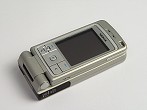
Well, I finally took delivery of a second-hand Nokia 6260 two days ago, and have been toying with it over the last 48 hours. I'm not going to comment on the software until I've had a chance to properly tinker with it, but this is a look at the hardware on a phone which was released in June 2004 which makes it, by my reckoing, nearly 3 years old now!

Generally I have difficulty believing in reviews of phones when they first come out, mainly because it is hard to assess just how durable they are in the short term. That said, two of the best reviews of the 6260 came up with a short list of hardware issues, even back then. These include:

  • Camera not in center of aperture.

  • LCD screen not aligned with frame.

  • Soft buttons located on flip, away from number pad.


  • All these are found on my phone, but to be honest are not causing me any problems at all. The camera is black, and the aperture around it is also black, meaning that unless you are a real stickler for perfection, the lack of alignment is barely noticeable. Of course, the fact that I paid around £40 all in for the phone, rather than its original retail proce means that I am less fimicky about things like that. The same goes for the slightly diagonal tilt to the LCD screen in the frame.

    I can understand why people would be annoyed with the sot keys being located on the upper part of the flip, rather than with the main keypad. It can get somewhat annoying when you are using the phone as a phone as, ergonomically, it presents a bit of a hurdle for your thumb. That said, it also means that the important navigation keys are available to you when you flip the phone into its "tablet" mode, as with most modern slider phones. This is particularly great for me because I don't really intend to use the phone as a phone, but more of a PDA, and I find I am using it more in this conformation than any other.

    In fact, this ability to flip into three different positions, as a regular phone, as a tablet and as a camcorder, is one of the appeals of this phone. The mechanics which enables the transformer-like ability is still working well after four years, and the screen rotation and flip are both quite tight still, and the electronics work well. Chalk one up for Nokia build quality! What is great is that if you want to watch a video in landscape mode, it is possible to lie it on its side on the table with the screen slightly rotated upwards for easy viewing. Not many phones which can do that!

    What I will say though, is that the rest of the phone has not worn well at all. The plastics used for the phone fascia are pretty durable, but have worn down with time, particularly on the edges where two pices come together. I am willing to give it leeway because this phone is, after all, four years old, but I must also say that i wish there wasn't quite so much plastic all over the phone. In closed clamshell mode you have a vast swathe of plastic on the top, then when open, under the keys is another field of plastic , and of course the back is basically an ocean of the material. This phone is not small, and picking it up, the first thing you do notice is the plasticky-ness of it. It just feels cheap (and it was cheap, but you get the picture).