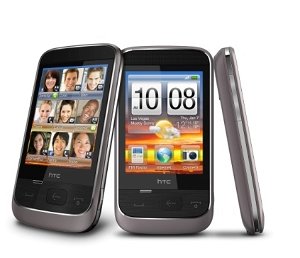
It has now been a week since I upgraded my phone to an HTC Touch Diamond. I’m on Orange and have been using its spiritual predecessor, the SPV M700 (HTC Trinity) for quite a while now, so this review is more to do with how the transition went. I’m very sceptical of upgrades because I realise that technology doesn't move all that quickly, and a new case does not a worthwhile upgrade make. Moreover, most of the time I suspect that the mobile phone operators are out to fleece you. This time was different though, because the iPhone 3G has just been released on O2, and it is a powerful bargaining chip with Orange.
Anyway, after speaking to customer retentions I negotiated an 18-month contract which includes 600 minutes of mobile/land line calls, unlimited text messages and 250MB of data, all for £30 a month. Crucially, it also gives me the unlimited home broadband deal (8Mbps ADSL and an Orangebox) for just £5 a month – a great overall saving which, to be truthful, keeps me loyal to them. I also got the HTC Touch Diamond (or as they call it, the ‘HTC Diamond’) for free. This compares well with other flagship phones which I would have had to pay for otherwise.
So what do I think of it after a week of use? Well, from the outside I must say that it is one of the most beautiful phones I have ever had. I really like the angular shape, the flush screen and the faceted back. It certainly compares favourably with my old HTC Trinity – with the leather case on the Diamond is actually still smaller than the Trinity! In fact it is significantly smaller than the iPhone and the N95 8GB, the much touted competitors of this phone. I can slip it into a pair of tight jeans without gouging myself in the groin.

Such minimalism does come with a few caveats though: the first is that there are much fewer hardware buttons on this phone. Although the traditional windows and OK button are missing, they have been replaced by the home and back keys. Significantly absent, however, are the voice command, recorder and camera buttons. The Trinity also had a fantastic scroll wheel and an extra OK button. I never normally use these buttons as they are designed but reassign them to launch specific programs. For instance, in my Trinity the camera button would launch the communications manager - really helpful for turning WiFi on and off.
There are no such hardware shortcuts in the Diamond, and all of these functions have to be launched instead through the touch screen interface. Although the touch wheel on the front of the device is capable of scrolling in certain programs, it is admittedly not as easy to use as the true wheel on the Trinity. Thankfully, the interface is a wonder to behold – TouchFlo 3D is easily the prettiest interface I have ever seen on any of my phones and combined with a VGA resolution (640x480) everything is in sharp technicolour. I was running Windows Mobile 6.1 with loads of interface tweaks on the Trinity, including the old TouchFlo as seen on the HTC Touch, and while it was a breakthrough at the time, this is so much better and it certainly has that wow factor, even after seven days of use. I get bored of interfaces after about a week, so it is doing well!
I notice that people have complained that the screen is unresponsive or sluggish, but I certainly have not found that to be the case at all. However, I must preface that with the confession that I am also one of those people who loves hacking the phone, and even before properly using my Diamond I had already downloaded and installed the tweaks available from xda-developers. This is not to be underestimated as a resource for optimizing and expanding your phone. The two key programs I installed are the
TouchFlo 3D configurator and
GSen, a program which enables the use of the accelerometer to rotate the screen.

Interestingly, Orange have decided to eschew any form of customization on the Diamond, and the only sign that it came from Orange is the very discreet logo on the battery case. In fact the Diamond thankfully includes a stock version of Windows Live Messenger, without the Orange (pay-for) customizations. Apart from the built-in apps I loaded on my usual set of must-have programs - Mobipocket, Vito Sound Explorer, TomTom 6, JB Piano, and 1-Calc Lite - as well as a half dozen or so games. I’ve also put Core Player on there for .avi video playback. I've also paired it with my ThinkOutside bluetooth keyboard. Everything works as it did on my Trinity, but seems speedier overall in terms of load times, and TomTom even gets a faster fix on the satellites from a cold boot (20s or so versus nearly 2 minutes on my Trinity).
I have also now set up my Google and Yahoo! email accounts so the phone pulls emails off the servers throughout the day. With web-browsing, RSS feed and weather updates as well, it is just as well that I a lot of data is included in my package! One thing I will add though, is that I have turned off 3G most of the time as it is a real battery sapper, the second major caveat of having such a small size and therefore a small battery. With 2G most of the time, apart from 3G for the odd bit of browsing, I am averaging 16-18 hours of battery life each day. Not great, but also not bad for such a tiny device.
In the end I am surprisingly happy with the HTC Touch Diamond. Many reviewers compare it with the iPhone 3G and the N95 8GB, but both of the latter two devices are more expensive and far larger than the Touch Diamond. In the end, in terms of actual useability, portability, functionality and value for money, I do think the HTC Touch Diamond is a winner!
 Nearly a month ago I asked myself what to do with my old phone now that my new one had arrived. Well, it turns out there are many merits to tinkering with a device which you don't have to rely on as a primary means of communication. I have long extolled the virtues of Windows Mobile as one of those operating systems where you can change anything from the browser to the UI, from the file explorer you use to the icons which represent the applications. What I hadn't expected, however, was the ability to totally change the OS of some of these phones. For that we have to thank the geniuses at HTC for making their phones so damn hackable, and the even greater geniuses at xda-developers for doing the actual hacking, and sharing the fruits of their labour with us mere mortals.